


Downtime tracking software records when a machine stops, why, and for how long, then turns that history into reports your team can act on. There are two approaches: sensor-connected platforms that detect stops automatically from the machine itself, and work-order-based systems that capture downtime as part of the repair that follows it. They solve overlapping but different problems.
Most buying guides for this category are written by companies selling the first kind. This one covers both, including where the second is the faster, cheaper starting point.
What downtime tracking software actually does
At its core, downtime tracking software does three things: detects or records a stop, captures a reason, and rolls that data into a report — usually a Pareto chart of top causes, a shift-by-shift downtime log, or an OEE (overall equipment effectiveness) trend.
Where implementations differ is in how the stop gets detected and recorded in the first place. That split matters more than any feature list, because it determines cost, install time, and what the data actually tells you.
Don't actually know your downtime numbers today?
See how MachDatum tracks itThe two approaches: sensor-connected vs. work-order-logged
Sensor-connected (automatic) downtime tracking. Platforms like Vorne, Evocon, Guidewheel, and MachineMetrics connect directly to a machine — through a PLC, a clip-on current sensor, or a machine controller — and detect a stop the moment it happens, down to the second. This is the right tool when you need line-level, second-by-second stop data: changeover analysis, micro-stop patterns, true OEE calculated from machine signals rather than estimates.
It comes with real costs: hardware to install (even a "clip-on" sensor is still a physical install per machine), a per-machine subscription (entry-level plans run roughly $99–300 per machine per month depending on the vendor, with enterprise on-premise options requiring a larger upfront license), and IT/OT coordination to get signals off the machine network safely.
Work-order-logged (CMMS-based) downtime tracking. The alternative approach ties downtime to the maintenance event that caused it. When a technician closes the work order for a breakdown repair, downtime hours are a required field — captured at the moment the job closes, alongside the asset, the root cause, and the failure mode. No PLC integration, no sensor hardware, no per-machine fee. The tradeoff is precision: you get downtime tied to a documented repair, not a second-by-second signal of every micro-stop.
One vendor in the sensor-connected category puts this tradeoff directly in their own marketing: a system that captures downtime as work-order history produces a clean record, but operates after the fact. That's a fair description — and also exactly the point. For a lot of plants, "after the fact but actually recorded, with a root cause attached" is a large step up from what they have today, which is often no consistent record at all.
| Sensor-connected | Work-order-logged | |
|---|---|---|
| Detection | Automatic, second-level, from the machine itself | Manual entry at work-order close, tied to a repair |
| Install | Physical sensor/PLC integration per machine | None — runs on the CMMS workflow already in place |
| Typical cost | ~$99–300/machine/month (SaaS), or a larger upfront license for on-premise | Included in CMMS cost, no per-machine fee |
| Best for | Micro-stops, changeover analysis, sensor-based OEE | A working downtime baseline with root cause and audit trail, fast |
| What it misses | Nothing tied to why unless paired with a maintenance workflow | Sub-minute stops that never became a work order |
Honest answer: which one do you actually need?
Ask two questions before deciding.
Do you need second-level, automatic stop detection? If your problem is micro-stops on a high-speed line, changeover time analysis, or calculating true OEE without relying on operator-entered numbers, you need a sensor-connected platform. No CMMS, including MachDatum, replaces that — it's a genuinely different tool solving a genuinely different problem.
Or is your actual problem that downtime isn't being recorded at all? If downtime today lives in a shift supervisor's memory, a WhatsApp message, or a paper log that gets transcribed (or doesn't) once a week, a sensor platform is solving a problem you don't have yet. The faster fix is making downtime a required part of closing the repair work order that already has to happen — no new hardware, live the same day the CMMS is rolled out, with an audit trail attached from day one.
Most plants running maintenance on spreadsheets and messaging apps are in the second category. Sensor investment is a step that comes after a working baseline exists — not instead of it.
A simple downtime log to start classifying causes
Before spending on any tool, this is the minimum that gets you a real Pareto instead of a guess. The template below has a locked dropdown for cause category (so entries stay consistent enough to total) and a second tab that auto-calculates the Pareto breakdown as you fill in the log — no pivot table required:
Machine downtime log template
Pre-formatted log + an auto-calculating Pareto Summary tab (data validation dropdown, conditional formatting, live SUMIF formulas) — ready to use in Excel or Google Sheets.
| Date | Asset ID | Asset Name | Start | End | Downtime (min) | Cause category | Notes |
|---|---|---|---|---|---|---|---|
| 2026-07-14 | PRS-004 | Stamping Press 4 | 09:12 | 09:47 | 35 | Breakdown — tooling | Tool change interlock fault |
| 2026-07-14 | PRS-004 | Stamping Press 4 | 14:05 | 14:20 | 15 | Changeover | Product changeover, batch 2211 |
Log it at the time of the stop, not at end of shift — that's the single biggest accuracy improvement available before any tooling purchase. A month of consistent entries, sorted by cause category, is your first real Pareto chart: the 20% of causes driving 80% of your downtime. That's the decision point for whether a sensor earns its cost, and for which specific line.
What to look for in downtime tracking software
Whichever category fits your plant, a few things separate a usable system from a data graveyard:
Reason codes tied to root cause, not just a stop timer. A tool that logs "machine down 47 minutes" without capturing why is a stopwatch, not a diagnostic tool. Look for mandatory reason capture, not an optional free-text field nobody fills in.
Reporting that surfaces patterns, not just totals. A monthly downtime total tells you almost nothing. A Pareto chart of the top five causes by asset, or an MTBF trend showing a machine's time-between-failures shrinking over six months, tells you where to act next.
No manual re-entry between systems. If downtime is captured in one tool and has to be retyped into a maintenance log or a spreadsheet to become useful, the data will eventually stop being kept current. The capture point and the analysis point need to be the same system.
Install time that matches your actual urgency. Sensor platforms with a same-day clip-on install exist; enterprise on-premise systems can take weeks of IT coordination. Know which one you're buying before you sign.
How MachDatum captures downtime
MachDatum's approach is the work-order-logged path described above. Downtime hours are a mandatory field on the work order transition that closes a repair — captured live as the job progresses, not filled in retroactively days later. That downtime rolls straight into per-asset analytics alongside MTBF and MTTR, computed automatically from closed work orders, no manual re-entry.
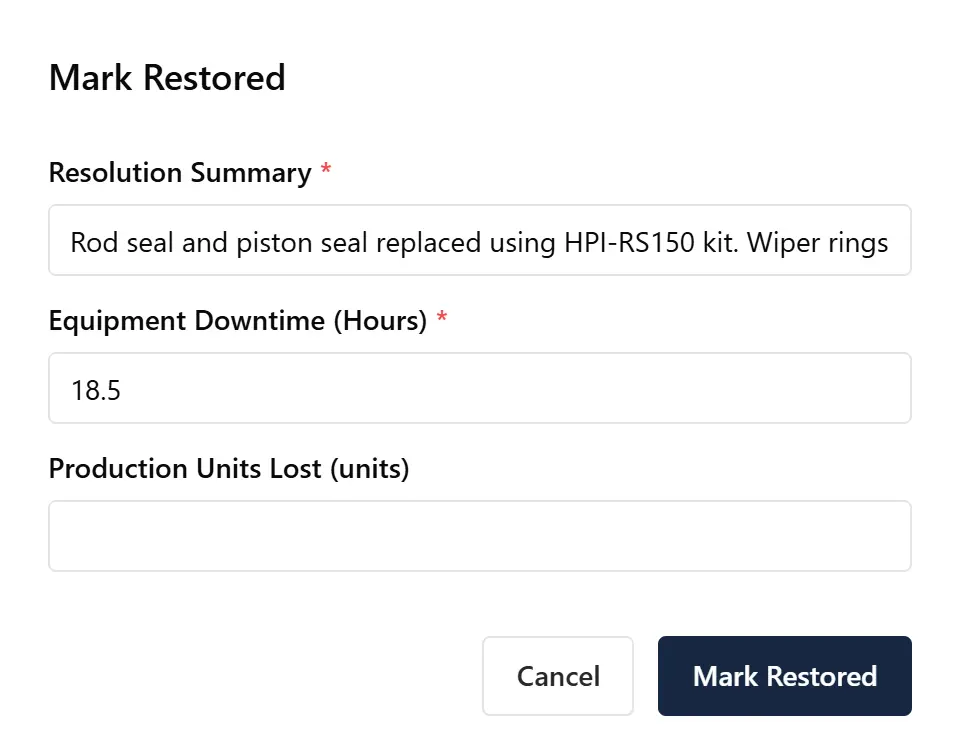
Where MachDatum fits: every repair work order requires a downtime duration and a root cause before it can close — no separate downtime log to maintain, no sensor install. That data rolls into MTBF and downtime-by-asset views automatically. If your plant needs second-level automatic stop detection for changeover or micro-stop analysis, that's a different tool for a different problem — we're straightforward about that. If the gap is that downtime isn't reliably recorded anywhere yet, this closes it without a hardware budget. We're onboarding our first group of manufacturing teams right now — see how it works.
In every plant I've walked into, downtime doesn't get logged when it happens — it gets logged at the end of the day, from memory. Reasons get clubbed together into whatever the technician remembers last: "breakdown," "material issue," sometimes just a shrug. By the time it's written down, the accuracy is already gone, and every cause bucket is muddier than the last one. This is the actual gap in almost every manufacturing shop I've seen — not that data collection is too slow, but that it doesn't happen in the moment at all.
Here's my honest take: a sensor is for optimizing something you already understand, not for figuring out what's wrong from scratch. If you don't know why your line is actually going down, a sensor can't tell you that — it just captures the signal faster. You can't get a sensor to figure out how to bake good bread; it just times the oven better once you already know the recipe. The order that actually works: classify your downtime causes first, get a real Pareto going — find the 20% of causes driving 80% of the loss — and only then decide whether a sensor is worth it for that specific top cause. Buying a sensor before that classification exists is buying speed for a signal you haven't figured out how to read yet.
Related: machine downtime
This page covers the software category. For what causes machine downtime, how it's calculated, and how to reduce it without buying tooling first, see our machine downtime guide.