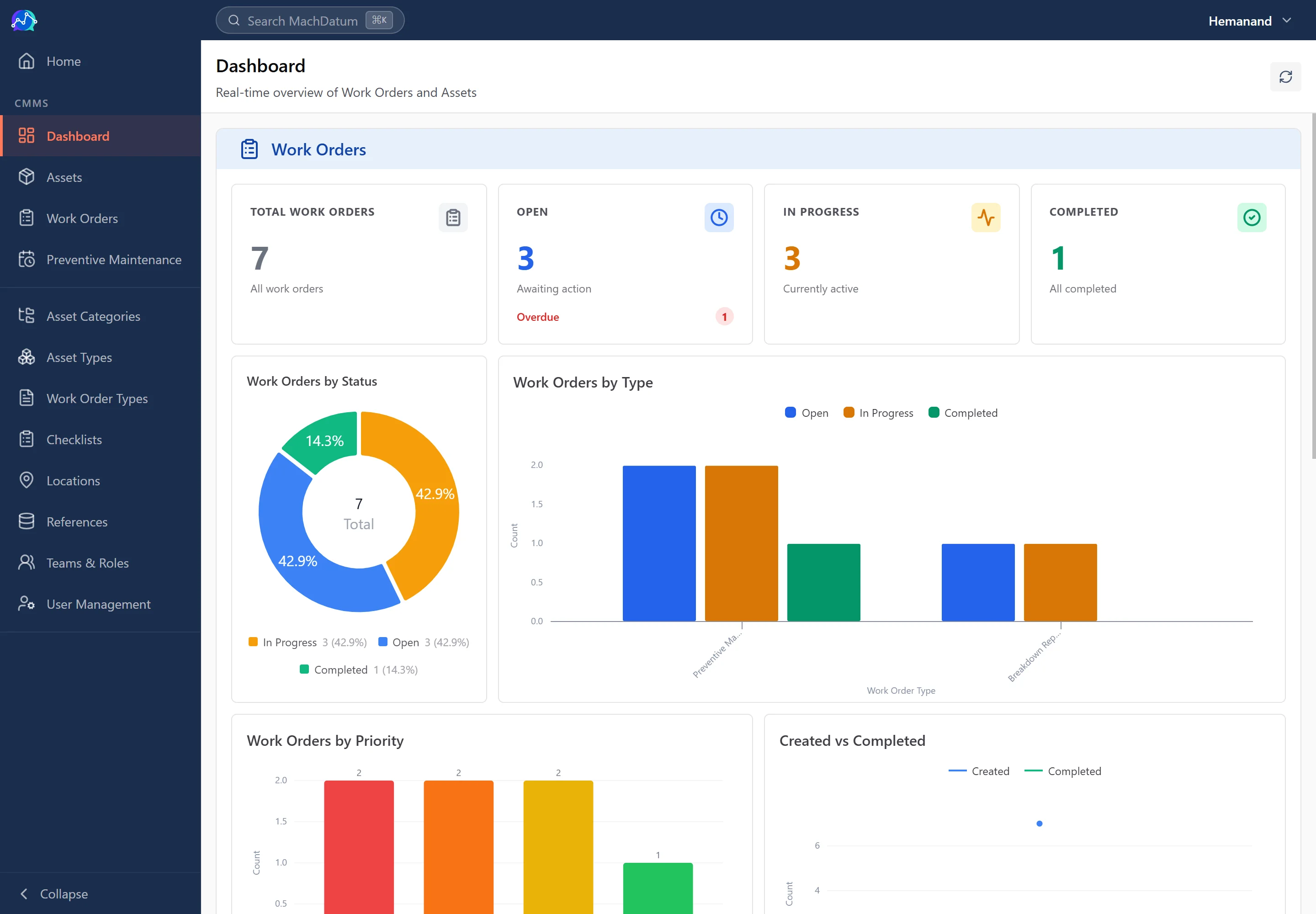




CMMS stands for Computerized Maintenance Management System — software that centralizes everything a maintenance team needs to manage: assets, work orders, preventive maintenance schedules, spare parts, and the data those generate. The word "computerized" has been in the name since the 1980s; today a CMMS is web-based and mobile, not a desktop program.
For most manufacturing plants, "what is a CMMS" is a question that arrives at a specific moment: the PM schedule is a spreadsheet no one fully trusts, breakdowns are tracked through a group chat, and someone in management has started asking why the same machine keeps failing. The software exists. The question is whether it fits and whether the timing is right.
This article gives you the full form and definition, explains what a CMMS does and does not do, distinguishes it from broader EAM platforms, and walks through the practical signals that tell a factory it has outgrown its current approach.
CMMS full form and definition
CMMS: Computerized Maintenance Management System.
That name is more descriptive than it sounds. Break it down:
- Computerized — the function exists whether or not software is involved. Plants have always managed maintenance. The CMMS computerizes it: stores the data, automates the scheduling, surfaces the numbers.
- Maintenance Management — not just work execution, but the whole management layer: planning, assigning, tracking, closing, measuring, and improving.
- System — not a single tool but a connected set: asset records, work orders, PM schedules, parts inventory, and the reporting that ties them together.
The term has been in use since mainframe-era maintenance software in the late 1970s and early 1980s. The category name has not changed. The delivery has — from desktop client–server software to web applications that run on a phone on the factory floor.
In everyday conversation, "CMMS," "CMMS software," and "CMMS system" are used interchangeably. "CMMS full form in maintenance" is the same answer regardless of phrasing: Computerized Maintenance Management System.
What a CMMS does
A CMMS is built around four core functions. Everything else — reports, dashboards, integrations — depends on these four working well.
Asset management
A CMMS gives every maintainable piece of equipment its own record. That record contains the asset's location, specifications, serial number, manufacturer, installation date, and attached documents — the OEM manual, the calibration certificate, the electrical diagram. Crucially, every work order raised against that asset, and every PM performed on it, is linked to that record.
The result: a complete, machine-readable maintenance history for every asset. Not scattered across a binder, a spreadsheet, and several message threads — in one place, queryable.
Custom asset schemas matter here. A CNC lathe and an air compressor have entirely different specifications, checklists, and service intervals. A CMMS should let you define the attribute set for each equipment class rather than forcing every asset into the same generic form. An air compressor record should have fields for operating pressure, motor rating, and filter replacement cycle. A lathe record should have spindle speed range and tooling specification. The maintenance history attached to each is only useful if the record it sits on reflects how that machine actually works.
Work order management
A work order is the unit of record for every maintenance job — breakdown response, scheduled PM, corrective repair found during inspection. The work order captures who raised it, which asset is affected, what was found when the technician arrived, what was done, how long it took, what parts were used, and how long the machine was out of service.
A CMMS manages the entire lifecycle: raising, assigning, tracking through configurable states (raised → assigned → in progress → awaiting parts → completed → closed), and closing with the data that makes the job useful beyond the immediate repair.
Without a work order, the job gets done but the record does not exist. The next time that machine fails in the same way — and it will — no one knows it has happened before. Work order management turns individual jobs into institutional memory. For a full treatment of the process and what the states mean in practice, see our guide to work order management.
Preventive maintenance scheduling
Preventive maintenance (PM) is scheduled maintenance carried out before failure — lubrication, inspection, part replacement, calibration — on a time or usage-based schedule.
The problem with PM at scale is memory. A factory with 80 assets might have 400 PM tasks across those assets, each on a different interval. Someone has to remember to schedule the monthly compressor inspection, the quarterly lathe spindle check, the six-monthly electrical panel inspection, and the annual pressure vessel certification — for every asset, every month. The spreadsheet tries. It fails.
A CMMS removes memory from the equation. You define the PM tasks for each asset once: what to do, how often, who it is assigned to, how long it should take. The CMMS creates and assigns the work orders automatically, before the scheduler has to remember. Nobody forgets. No job slips because the planner was on leave.
This is PM auto-dispatch — and it is the single function that justifies a CMMS for most factories that are mid-sized and growing. For the fields a real PM checklist needs, see our preventive maintenance checklist guide.
Reporting and analytics
A CMMS computes maintenance KPIs from the work-order data that is already being collected — see our full breakdown of the seven maintenance KPIs worth tracking.
MTTR (mean time to repair): the average time between a breakdown being logged and the asset returning to service. Computed from downtime hours captured at close on every breakdown work order.
MTBF (mean time between failures): the average time an asset runs before its next failure. Computed from the gap between consecutive breakdown work orders on the same asset. See our MTTR vs. MTBF guide for how the two relate.
PM compliance rate: the percentage of scheduled PM work orders completed on time. The numerator and denominator both come from the CMMS's PM schedule.
Downtime by machine and shift: how long each asset was out of service in a given period, broken down in any way the plant manager needs.
None of these require a separate data-entry step. They are byproducts of work orders that the team is already raising and closing. The analytics are only as good as the data capture discipline — root cause required at repair start, downtime hours required at close — but the calculation itself is automatic.
What a CMMS replaces
The starting point for most factories evaluating a CMMS is not a blank slate. Three tools are already in use.
Excel for PM schedules
The spreadsheet that was accurate in January, had two people editing it in February, and stopped reflecting reality by March. There is no automatic dispatch — someone has to remember to message the technician when a PM is due. There are no overdue alerts. There is no mobile access on the floor. When the maintenance planner is on leave, the PM schedule pauses.
The spreadsheet is also a point of failure for ISO audits. "Show me your PM completion records for the last six months" requires reconstructing evidence from a file that was not designed to be an audit trail.
Group chats for work requests
The breakdown is reported in the maintenance group chat. Someone in the group responds. The machine gets fixed during the shift. The shift changes. The day-shift supervisor did not see the thread. The same problem gets reported again by the next operator on the same machine.
Even when the response is timely, nothing is captured. No root cause, no downtime hours, no parts used. The job is done; the record does not exist. MTBF calculation is impossible. Purchasing decisions for spare parts are made on gut feel because the failure frequency data was never recorded.
Paper job cards and binders
The information exists — somewhere. Finding it requires knowing which binder it is in, which year, which machine. An ISO auditor asking for last quarter's PM records triggers a search that takes half a day. MTBF calculation requires counting physical cards by hand, which means it never gets done. Insights that exist on paper — "this bearing fails every eight months" — never make it into a PM schedule because there is no mechanism to act on a pattern that no one is tracking systematically.
What a CMMS does not do
This is the honest section.
It does not monitor machines. A CMMS manages maintenance records. It does not collect real-time condition data from equipment. That is condition monitoring and IIoT — vibration sensors, thermal cameras, current transducers feeding a monitoring platform. A CMMS can receive triggers from condition monitoring and create work orders in response; it does not itself sense equipment state.
It does not compute OEE. Overall Equipment Effectiveness has three components: availability, performance, and quality. A CMMS manages the maintenance side of availability — it can tell you how long a machine was down for maintenance reasons. Performance (was the machine running at rated speed?) and quality (how many parts were rejected?) require production and quality data that the CMMS does not collect. OEE calculation needs all three; a CMMS gives you one component.
It does not replace the engineer's judgment. A CMMS gives the engineer's judgment something to work from — actual failure history, actual MTBF, actual parts consumption — instead of memory and estimation. The decision about whether to rebuild or replace an aging motor, whether to increase PM frequency after a string of failures, whether a machine is worth keeping: those remain human calls. The CMMS makes the data available; it does not make the decision.
It does not fix a plant with poor maintenance culture. A CMMS makes a good maintenance culture more effective — it automates what was being done well manually, captures what was being observed informally, and surfaces the numbers that were being estimated. A maintenance team that does not complete PMs will not complete them in a CMMS. The software makes a mediocre culture more visible, which is occasionally the first step toward changing it, but visibility is not transformation.
CMMS vs EAM
The terms appear together frequently enough that the distinction is worth stating clearly.
CMMS — Computerized Maintenance Management System — focuses on the maintenance operation: work orders, PM schedules, asset maintenance history, and the KPIs those generate. It is built for the maintenance manager, the planner, and the technicians doing the work.
EAM — Enterprise Asset Management — is a broader category. It extends beyond maintenance operations into asset lifecycle costing (acquisition, depreciation, disposal), capital planning, procurement integration, compliance frameworks, and multi-site asset hierarchies. EAM is more common in utilities, government infrastructure, mining, and industries where a single asset represents a major capital investment and its lifecycle extends over decades.
For a manufacturing plant with 50 to 1,000 assets and a maintenance team responsible for keeping production running, a CMMS addresses the actual problem. Full EAM capability adds overhead — procurement workflows, capital project management, complex depreciation modules — that most maintenance teams neither need nor want to manage.
The lines blur in practice. Modern CMMS platforms include some EAM features — spare parts inventory, basic depreciation tracking, vendor management, including tracking vendor service agreements like an AMC against the asset it covers. Some ERP suites include a maintenance module that covers CMMS territory. If you are evaluating software for the first time and your primary question is "how do I get PM schedules running automatically and stop losing breakdown records in a group chat," you are looking for a CMMS, not a full EAM.
When a factory needs a CMMS
A CMMS is not the right tool for every plant at every stage. The honest answer is: some factories do not need one yet, and some have needed one for longer than they realize. These signals tell you which side of the line you are on.
You have more than 20–30 assets that require scheduled maintenance. Below this threshold, a disciplined spreadsheet and a maintenance technician with good habits is often sufficient. Above it, the interdependencies between schedules, technicians, and parts start to outgrow what a spreadsheet can track reliably.
Your PM schedule lives in Excel or someone's memory. Both are effectively the same — the schedule is fragile, person-dependent, and lacks automatic dispatch. If your PM planner were away for two weeks, would the right jobs still get done on time?
You have had the same breakdown twice on the same machine in the last 12 months. The second occurrence of an identical failure on the same asset is a data problem as much as a maintenance problem — see our breakdown maintenance guide for why repeat failures happen. If the root cause from the first failure had been captured and acted on — a corrective PM, a changed interval, a parts stock adjustment — the second may not have happened.
Your maintenance team spends most of its time on emergency repairs rather than scheduled work. The standard framing is the reactive-to-proactive shift. A CMMS does not automatically move a reactive team to proactive, but it gives the data — PM completion rates, breakdown frequency per asset — that makes the case for where PM investment should be concentrated.
You are preparing for ISO 9001, IATF 16949, or any audit that requires maintenance records. These standards require documented evidence of PM completion, calibration records, corrective action on equipment, and maintenance history. A CMMS produces this evidence as a byproduct of normal operation. An Excel sheet and a group chat require reconstruction.
You have more than five maintenance technicians across shifts. Coordination — who is working on what, what is overdue, what was handed off — becomes a management problem at this scale. The CMMS replaces the morning coordination meeting and the shift handoff conversation with a shared view of every open job.
The honest qualifier: a factory with 10 assets and one technician may not need a CMMS. Excel and discipline is enough, and adding software adds overhead without proportionate return. A factory with 150 assets and 10 technicians across two shifts almost certainly does — and if it does not have one, it is paying for the absence in untracked downtime, repeated failures, and audit preparation effort.
If you want a number instead of a gut feel on which side of that line you're on, our free maintenance calculators — MTBF, MTTR, OEE, and availability — turn a few inputs from your own equipment into a metric you can compare against the signals above.
The gap that led to building this wasn't from hardware conversations — it came out of software service projects we ran for manufacturing clients. AI in the CMMS space was almost entirely aimed at predictive maintenance — sensors and failure prediction — and almost nobody was building it into preventive maintenance itself, or into actually resolving a breakdown once it happened. That's the gap MachDatum's CMMS was built to close.
Most manufacturing plants are further along in maintenance maturity than the "no process at all" stereotype suggests. Even the least mature plants we've evaluated with are running some kind of formal, if manual, documentation process. The CMMS conversation is rarely about introducing a process from zero — it's usually about digitizing and enforcing a process that already exists on paper.
How to choose a CMMS
Once a factory decides a CMMS is the right move, the evaluation question shifts from "what is a CMMS" to "which CMMS fits this plant."
The dimensions that matter in practice:
Mobile app quality. Most maintenance work happens away from a desk — on the floor, at the machine, in a compressor room. A CMMS that requires a desktop browser for anything beyond the most basic update will not be used by technicians in the field. QR code scanning to pull up an asset record, photo capture to document a finding, and status updates from a phone are table stakes.
Configurability per asset type. Every plant has different equipment classes with different maintenance needs. A CMMS should let you define the attribute set and checklist for each class, not force every asset into the same generic form.
PM auto-dispatch. Does the system create and assign PM work orders automatically on schedule, or does someone still have to trigger the job? Auto-dispatch is the difference between a CMMS that removes memory from PM management and one that merely makes the spreadsheet digital.
Pricing model. Per-user pricing penalizes growth — as more technicians come on, costs scale linearly. Per-site pricing is more predictable for plants with stable headcount and seasonal or contract labor.
Implementation time. A CMMS that takes six months to configure before the first work order is created is a CMMS that does not get fully adopted. Plants need to see the system working — with their assets, their PM schedules, their technicians — within weeks.
Local support. For a manufacturing plant, the CMMS is operational infrastructure. When it has a problem, the support response cannot wait two business days across a time zone.
For a detailed comparison of CMMS options manufacturers should evaluate — what to prioritize, what each vendor offers, and the honest tradeoffs — see Best CMMS software for manufacturers (2026).
Where MachDatum fits: a CMMS built for factories, not enterprise IT departments. Custom asset schemas — your CNC lathe and your air compressor have different maintenance needs, and the system knows that. PM auto-dispatch creates and assigns work orders before the scheduler has to remember. MTTR, MTBF, and downtime per machine are computed automatically from work-order history — no separate data entry. Per-site pricing, no per-user fees. Asset import from Excel is included in onboarding; your first work order within a week. We're onboarding our first group of manufacturing teams right now — see how MachDatum works.