
How to View Guest Booking Details
Access Info
Only admins have access to the Guest Booking feature.
Adding a Guest Booking
Navigate to the Guest Booking page.
Click the Add Guest Booking button at the top-right corner.
A popup will appear where the following fields must be filled:
Requested By: Select the user who made the request.
Start Date and End Date
Meal Type: Choose Breakfast, Lunch, or Dinner.
Quantity: Enter the number of meals for the selected type.
Remarks (optional)
Holidays within the selected date range will be shown.
Click Add Booking to confirm.
Once the booking is added, the system redirects to the Update Guest Booking page.
Updating Guest Bookings
Once a booking is created, the Requested By, Dates, and Meal Type cannot be changed.
Quantity can be modified only before the cutoff time of the booking date.
If multiple dates are booked:
Admin cannot update all quantities at once.
Instead, individual quantity fields will be shown for each date.
Admin can update quantities per date, before each respective cutoff time.
To cancel a meal for a specific date, click Delete for that date (also before the cutoff time).
Viewing Guest Bookings
Admin can view all active guest bookings (i.e., bookings with at least one upcoming date).
Past bookings (where all dates have passed) will not be shown.
Example: If today is 1st July:
• A booking from 27th June to 3rd July will be visible.
• A booking from 27th to 30th June will not be visible.
Filters & Search
Admins can filter guest bookings by:
• Requested By
• Meal Type
• Department
Use the search bar to find bookings by:
• Employee Name
• Guest Name
User Access
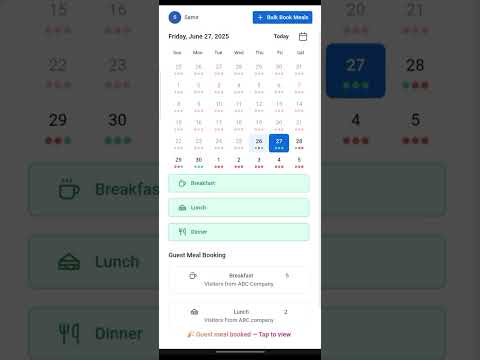
A user can view the details of Guest booking made by the admin by clicking the username at the top left corner and selecting Guest Details.
Want to learn more?
Browse all guides →